The Geospatial Engineering Platform.
Point Cloud · Surface & Contours · Volumes · Sections · GIS · CAD · Topo-Survey · Field-to-Finish.
Most engineering and geospatial workflows require five or more separate tools. AutoTerra Pro Spatial brings them all under one roof.
From classifying a billion-point cloud to generating a 3D flythrough animation, drafting a finished CAD plan, balancing a traverse, and producing georeferenced section reports — AutoTerra Pro Spatial handles the complete workflow in a single session without exporting to another application.
AutoTerra Pro Spatial is a CAD-dominant geospatial platform where survey data, point clouds, GIS layers, terrain surfaces, and background imagery all live and work together natively.
Data processing, GPU rendering, Multiple auto classification, 3D animation, Down processing.
CAD-native GIS import, attribute editing, topology checks, Audit options, 8 online/offline map sources.
Cad engine, Layers, Layout, Dimensions, Blocks, Annotation licence. Popular drawing format exchange. — no separate CAD.
TIN surfaces, break lines, exclusing & inclusion boundaries, contours, slope/aspect, OBJ/STL/PLY export.
Alignment-based long sections, cross-sections, point cloud corridor sections, section templates, PDF output.
Code library, Field-to-finish, Total Station/ DGPS/ Theodolite/ Tacheometer/ Digital level, COGO, traverse adjustment, LandXML.
DTM-to-DTM, elevation reference, grid-based, section-based — cut/fill visualization and reporting.
Bing Aerial/ Road/ Hybrid, OpenStreetMap, Custom WMTS/XYZ Tiles — online and offline cached options. KML/KMZ Import export.
Road & corridor design platform —Upcoming (see page 10 for early access details).
Multi-sheet layouts, cross-section reports, georeferenced image export, PDF output.
Every workspace in AutoTerra operates within a unified engineering & geospatial environment. Point cloud classifications update terrain models instantly, allowing DTM surfaces, profiles, sections, and volume calculations to remain continuously connected to the same source data.
Survey observations, GIS layers, CAD geometry, terrain surfaces, and background imagery coexist within a single project session, eliminating repetitive export-import workflows between separate applications. GIS features remain editable as native CAD entities, while live map services provide real-world geospatial context across every view
Field survey codes are automatically transformed into production-ready CAD drawings at import, reducing manual drafting effort and improving workflow consistency. Traverse computation, terrain modelling, cross-sections, reporting, and visualization all operate on the same integrated data model.
This is the core AutoTerra philosophy: one platform, one coordinated workflow, one connected dataset.
From raw point cloud to final deliverable, AutoTerra Pro Spatial keeps the entire geospatial workflow inside a single integrated environment. Load and classify LiDAR data in live 3D, generate terrain surfaces, validate against real-time aerial imagery, produce CAD-ready survey drawings from code libraries, extract profiles and cross-sections, balance traverses, compute cut/fill volumes, create presentation-ready flythroughs, and publish final reports — all without exporting data between disconnected applications.
AutoTerra Pro Spatial supports the full 8-bit LAS classification space — all 256 class values — each with its own independently assignable colour. Switch between colour modes instantly. Stay interactive at any dataset size.
The colour mode is set per dataset and updated live from the display panel. All modes are GPU-rendered via GLSL shaders — switching colour mode does not require a re-render pass.
Renders using the RGB values captured by the sensor camera. Photorealistic view for scene review, site familiarisation, and client presentations.
Easch 256 LAS class values (0–255) has its own user-assignable colour. The 19 standard LAS classes ship with professional default colours; classes 19–255 are fully configurable for custom coding schemes.
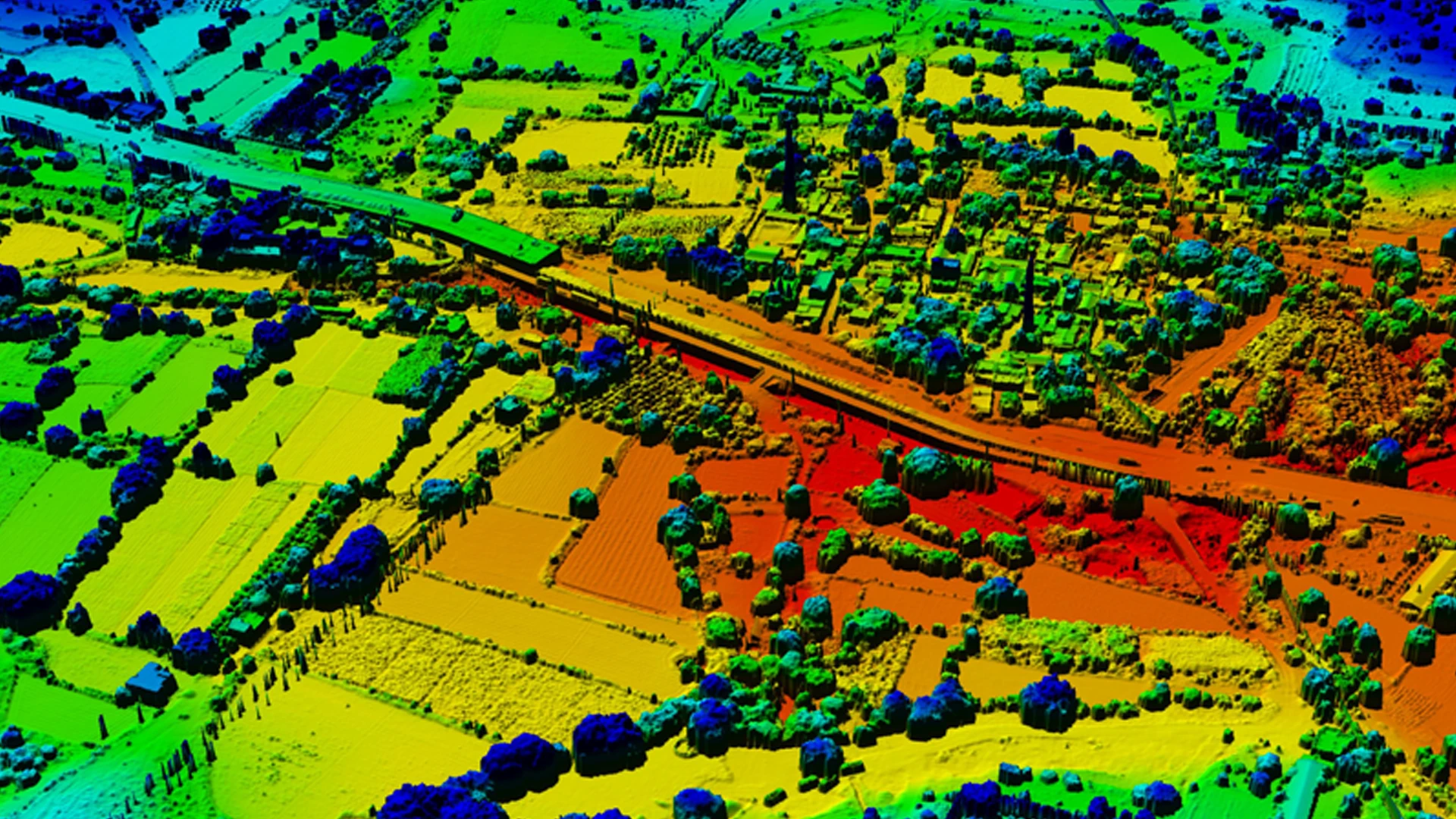
A continuous colour gradient across the dataset Z range — Visible Classes, Visible Display, or Fixed Range modes. Immediately reveals terrain variation, stockpile profiles, and building heights.
Renders by LiDAR return intensity — the reflectance value per surface. Highlights material boundaries invisible in RGB or elevation views. Useful for road condition assessments and surface differentiation.
Combines true-colour RGB with an elevation gradient using configurable blend modes (Multiply, Add, Overlay, Custom). Terrain structure visible through the colour photograph.
Overlays intensity data onto the RGB image for richer surface detail — particularly effective for road surface condition surveys and detecting material boundaries in dense urban scans
AutoTerra Pro Spatial is designed for high-performance geospatial processing across the entire workflow. Fast data loading, GPU-accelerated rendering, tile-based processing, and optimized memory management keep the platform responsive even on large-scale point cloud projects. Classification, terrain generation, raster export, and visualization operations are engineered for efficient execution, enabling smooth interaction with massive datasets throughout the project lifecycle.
Point Cloud datasets load rapidly with smart pre-filtering — only needed points enter memory
Billions of points navigate interactively without frame drops — no waiting for re-renders
Colour mode changes (RGB, Classification, Elevation, Intensity) apply without re-loading
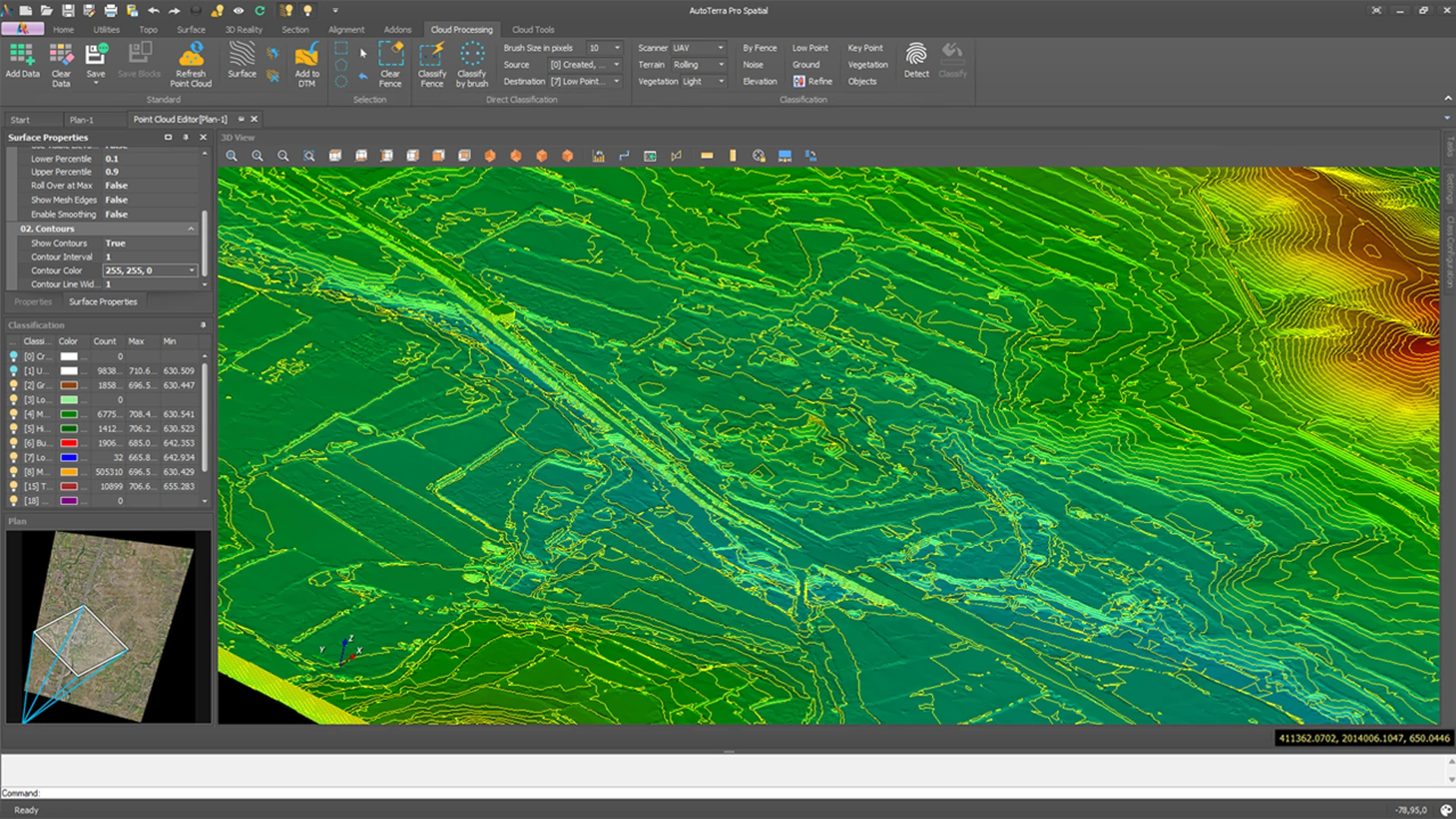
Banded, continuous, and contour surface displays update in real time as display settings change
The 3D surface render stays fully active during fence selection and reclassification — no viewport freeze
Ground, building, and vegetation routines run at speeds competitive with leading specialist platforms
Classification and export routines execute across project tiles concurrently — large projects complete faster
Efficient raster export pipeline handles very large point counts without memory bottlenecks
Create georeferenced RGB imagery from raw point cloud colour values at full resolution
Fill gaps in sparse point clouds with configurable interpolation — produce higher-resolution output for both DSM and RGB raster
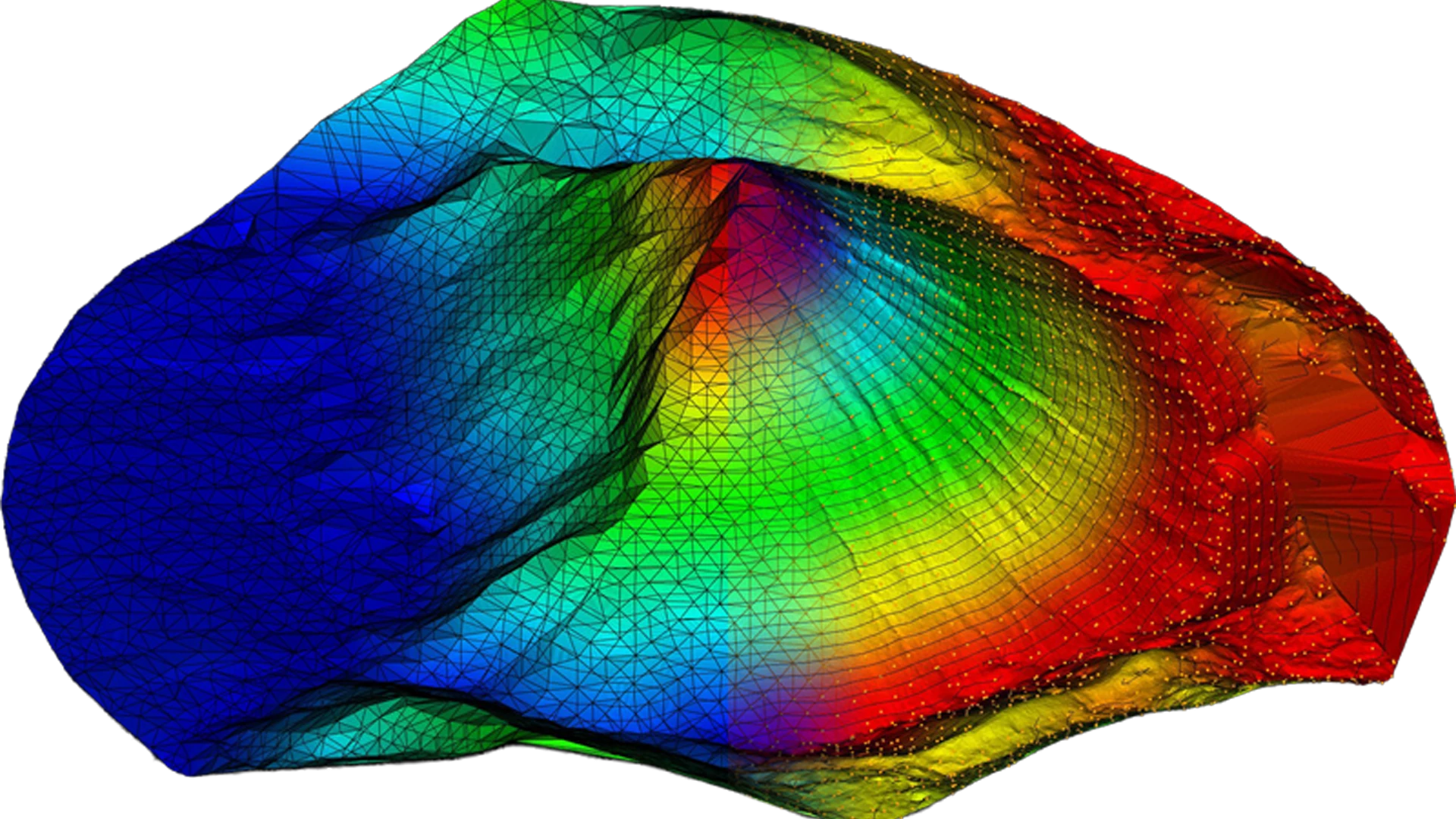
AutoTerra Pro SpatialAutoTerra Pro Spatial renders a continuous 3D surface directly from the point cloud in real time — without requiring intermediate mesh generation or terrain preprocessing. Surface visualization remains active during selection, classification, and editing workflows, providing immediate spatial feedback throughout the entire interaction process.
As fences are drawn or classifications are updated, the surrounding surface updates dynamically, allowing operators to review terrain continuity, object boundaries, and classification impact instantly within the live 3D environment.
✔ Banded elevation visualization for terrain transition analysis
✔ Continuous elevation gradients for surface continuity review
✔ Contour visualization directly on the point cloud
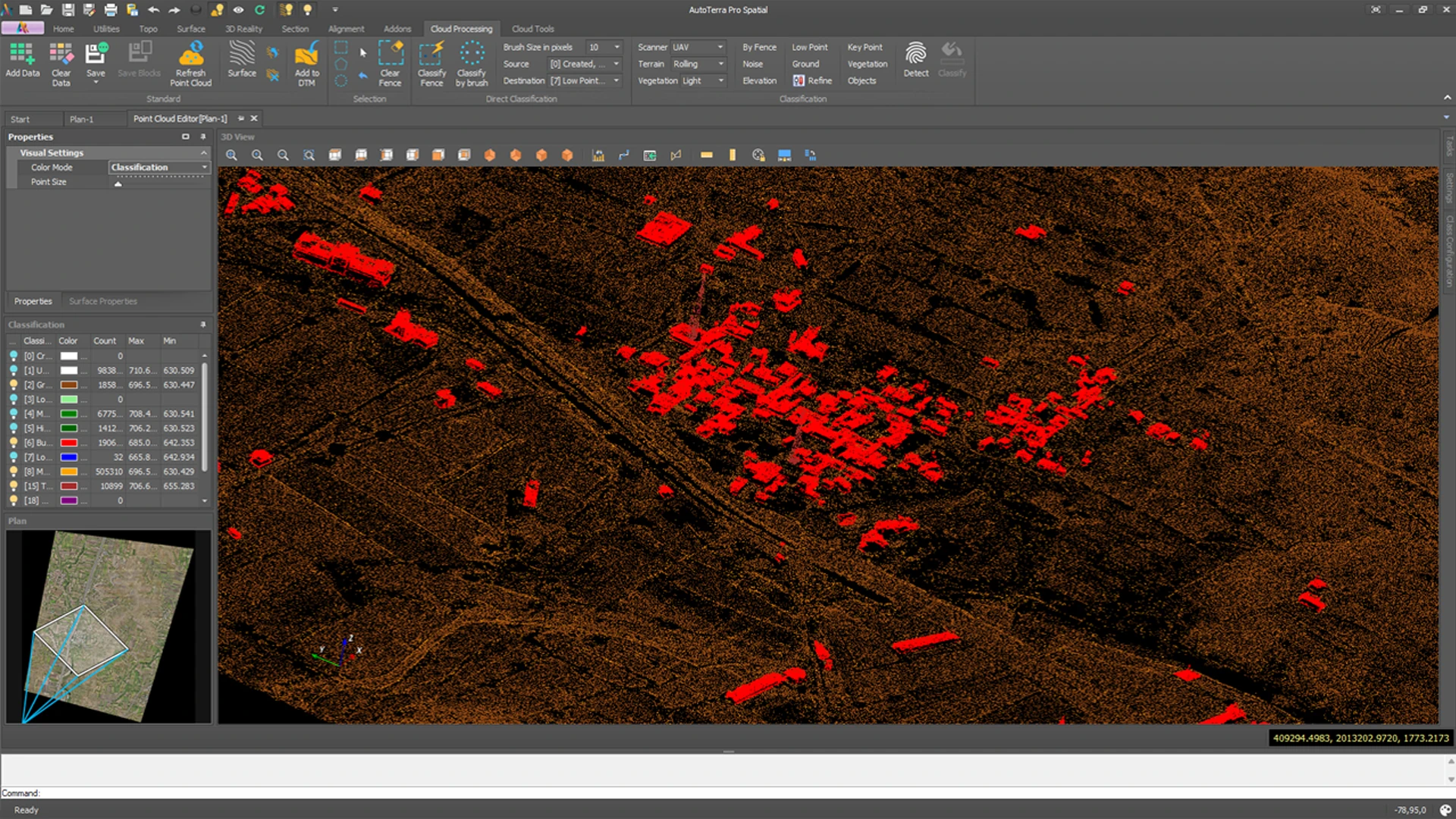
✔ Classification-based rendering using configurable class colours
✔ Real-time surface updates during editing/reclassification
✔ No separate mesh or DTM generation required for visualization
✔ Full 3D context maintained during fence and brush operations
✔ Responsive surface interaction on large-scale datasets
✔ Immediate visual verification of classification changes
✔ Integrated visualization for inspection, QA, and terrain interpretation
AutoTerra supports multi-return LiDAR data natively. Each return (First, Second, Last, Only, and intermediate returns) is stored and accessible as part of the point record. Multi-return data is critical for vegetation penetration analysis, powerline corridor surveys, and canopy structure mapping.
Top-of-canopy and hard surface reflections — highest point in the beam path. Ground penetration returns — basis for bare-earth extraction in vegetated areas
Mid-canopy and structure returns — critical for powerline and vegetation structure
Filter during data import to use return
All return metadata retained through processing, filtering, and export
Create compelling 3D flythrough animations directly from your point cloud data — without specialist animation software. Perfect for client presentations, project reviews, and stakeholder communication.
Define a camera path through the point cloud along any alignment, GPS track, or freehand route. AutoTerra animates a smooth flythrough at configurable speed and field of view. Export as video for direct use in presentations and reports — no third-party 3D software required.
Animate through a particular focus— ideal for road, drainage, and utility corridor inspections. Each frame corresponds to a chainage station, letting reviewers experience the entire route sequentially in 3D.
Capture full-scene panoramic views of your point cloud at any viewpoint. Combine with classification colour modes to highlight specific features — buildings in red, vegetation in green, bare earth in brown — for maximum visual impact.
| Routine | Description |
|---|---|
| Low Point Detection | Below-surface isolation configurable |
| Noise Removal | Multi-axis outlier/spike removal |
| Ground Classification | Progressive TIN bare-earth |
| Vegetation Tiering | Low/Med/High, individual tree |
| Corridor Classification | Dedicated pipeline for road/rail |
AutoTerra’ s classification system is built for the real world — various distinct object categories, full 3D interactive editing, dedicated analysis tools, and section/profile views for classification audit. Classify with precision. Verify in 3D. Deliver with confidence.
This is one of AutoTerra’ s most significant differentiators. All classification tools — brush, fence, and automated routines — operate directly in the live 3D viewport. You see the classification result in 3D as you work. Colour changes, class boundaries, and neighbourhood context are all visible in real time. There is no "switch to 2D to classify then back to 3D" workflow — every operation happens where the data lives.
Classify exactly the points you see from any camera angle
All fence modes work in perspective, top, front, and section views
Show/hide specific classes to inspect results at any stage
Points update colour instantly as class is assigned
Every edit tracked
Top-down fence and brush for roof surfaces and horizontal features
Classify from a cross-section — isolate walls, ground, or utilities
Isolate one or more classes for focused review and editing
High-quality splat render stays active during editing for context
Independently configurable routines cover every stage of the classification workflow — from noise isolation and bare-earth extraction through to structure detection, vegetation tiering, and corridor asset classification. Each routine can run across the full dataset or be fence-constrained to a specific area, and any combination can be saved as a task queue for automatic execution across all project tiles.
Three project-level inputs guide all routines before any parameter is applied — ensuring presets are appropriate for the scanner, site geometry, and vegetation without manual threshold tuning:
Below-surface artefact isolation with grouping radius and sensitivity configurable per scanner type
Multi-axis outlier detection covering High Noise, spikes, and XY scatter; with configurable sensitivity
Progressive TIN bare-earth extraction; with seed method tuneable as per terrain type
Post-processing pass for demotion of misclassified roofs, treetops, and elevated artefacts.
Geometry-preserving thinning → Class 8; Model mode for TIN input or Contour mode matched to the final drawing interval
Height-above-ground tiering into Low / Medium / High with configurable reference classes; individual tree detection optional
Detects 8 toggled categories — buildings, bridges, vehicles, poles, power lines, signs, billboards, and water — each with dedicated parameters (see below)
Assigns all points above or below a defined Z threshold to any target class; invert range supported
Fence-based manual reclassification.
Dedicated corridor pipeline using guidelines; focuses ground, vegetation, and object relevant to corridor.
Autodetects source, Airborne, UAV, Mobile, or Terrestrial — adapts point density assumptions, seed methods, and edge detection to the capture geometry
Flat, Urban, Mountainous, Steep Face, Stockpile, or Corridor — tunes iteration angles, distances, and surface model expectations accordingly
None through Dense — controls height thresholds, canopy penetration assumptions, and ground seed behaviour in vegetated scenes
Automatically activated in corridor workflows — aligns all routines to guide-line geometry
Object Detection is not a single pass — each category is individually toggled and carries its own parameter set. Run only the categories relevant to the dataset:
Planar roof and wall detection; min footprint, planarity, roughness, and sub-patch parameters for complex rooflines
Elevated planar deck structures; span and clearance geometry aware
Moving and stationary vehicles on ground or road surfaces, with filters to prevent false positives
Vertical linear structures — streetlights, utility poles, masts; corridor guide integration for alignment-based assets.
Linear catenary detection between detected poles; highly effective with corridor projects
Flat elevated panels separate roadside signage from building facades
Low-reflectance flat surfaces below surrounding terrain — pond, river, canal, and drainage area detection
Every category draws from user-defined source classes and references the project ground model — previously classified data is protected during each detection pass
AutoTerra Pro Spatial supports a fully tiled project architecture. Any dataset — no matter how large — can be split into a spatial grid of tiles and managed as a single unified project. Classification routines execute block by block across the tile set, so project scale is limited only by storage, not by memory or processing time.
Divide any oversized point cloud into a spatially indexed tile grid in one operation
Combine tiles from different scan sessions, dates, or instruments into one unified project
Run any routine on individual tiles or selected blocks without touching the rest of the project
No edge artefacts between adjacent tiles — results are consistent across block boundaries
AutoTerra’ s Task Macro system lets you define a named sequence of classification routines and processing operations, then execute that sequence automatically across all tiles in the project. Set it up once — reapply it to any new dataset with one command.
Define a named sequence: ground extraction, building detection, vegetation separation — in any order, with saved parameters.
Execute the task across the full tiled project. Large projects complete without manual intervention.
Apply the same task macro to new scan data. Consistent classification results across update surveys, change detection, and multi-date datasets.
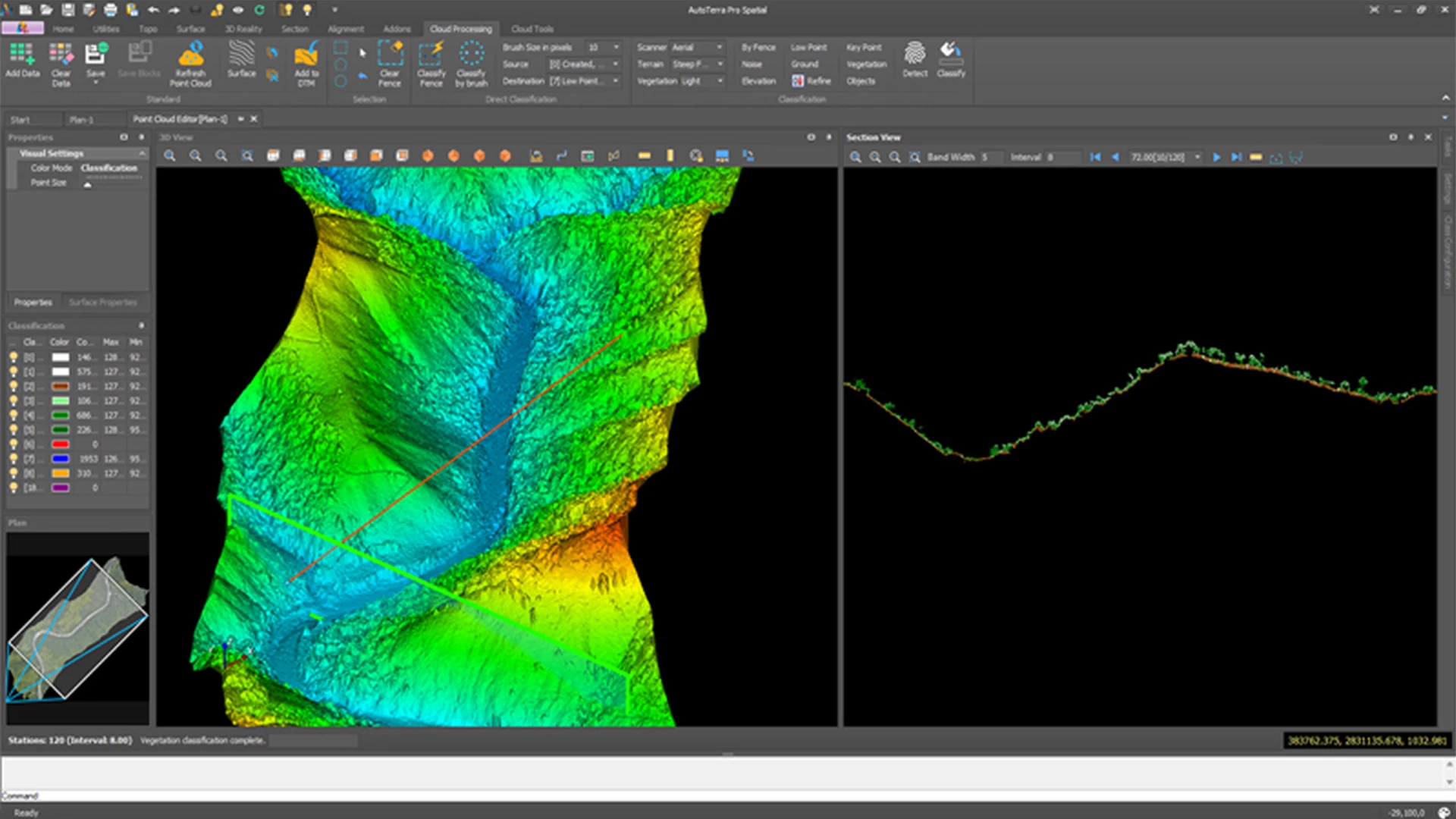
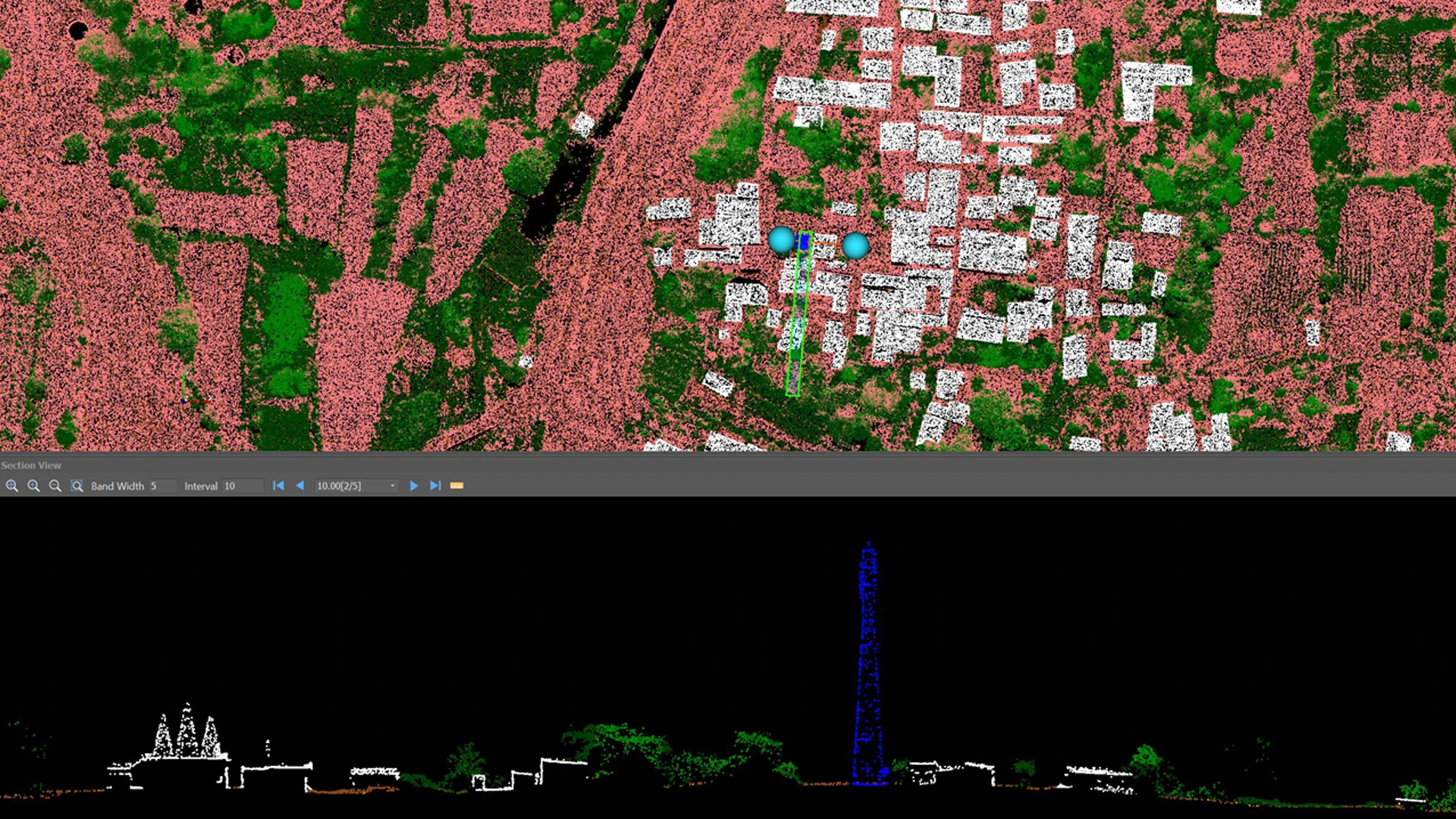
AutoTerra Pro Spatial provides dedicated section and profile workflows directly on the raw point cloud — before any terrain surface or DTM is generated. This environment is designed for classification audit, structural inspection, ground verification, and fine-tuned manual refinement directly from the LiDAR returns. Section & Profile view remains dynamically linked to the live point cloud dataset, enabling inspection on class accuracy, validate terrain separation, review structures and perform targeted reclassification with full spatial context.
Extract a corridor section from two user-defined points with configurable width.
Step through cross-sections at any interval along an alignment.
Inspect classification accuracy at every cross-section before surface generation.
3D view, plan view, and section view remain synchronized for coordinated inspection and navigation.
Display only selected classes within the section view to isolate target features and improve audit precision.
Show only selected classes in section view — isolate ground, buildings, or any target class
Below line & and Above line classification are available in section view along with brush, direct fence for greater control and fine tune.
Pre-computed section bounds for fast station stepping.
Measure heights, distances, and slopes directly on section views.
AutoTerra Pro Spatial combines fence-based and brush-based workflows into a unified interactive classification environment for rapid point selection, inspection, and reclassification directly in 3D, plan, and section views.
Fast rectangular selection for corridors, buildings, and site areas.
Flexible irregular selection for complex terrain and objects.
Radial selection for stockpiles and circular features.
Use existing CAD polylines or GIS polygons directly as selection boundaries.
✔ Direct fence-based classification.
✔ Brush classification with adjustable radius.
✔ Click and continuous drag classification modes.
✔ Works in 3D, plan, and section environments.
✔ Cuboid and band-based selection support.
✔ Full undo / redo workflow tracking.
Shift by exact X, Y, Z displacement.
Non-destructive Z-range clip.
Rectangular plan footprint clip.
Combine multiple LAS files into one dataset
Pre-filter by Z, XY, class, skip — live point count.
LAS / LAZ — Smart filter at import: elevation, XY, class, skip interval — live point count before load.
E57 — Structured scanner data, direct import.
PLY — Column-mapping wizard for flexible import.
Text / CSV — Any delimiter — X, Y, Z, Intensity, Class, Return.
Multi-File Tile Set — Virtual cloud assembled from spatially indexed tiles.
LAS Export — Full attribute and class preservation; format version selectable.
DSM Export — Efficient raster export pipeline handles millions of points; tile-by-tile processing, no memory bottleneck.
RGB TIFF from Point Cloud — Georeferenced full-colour raster from raw LiDAR RGB values — no ortho step required.
Interpolated DSM & RGB — Fill voids in sparse returns with configurable interpolation — produce higher-resolution output.
OBJ / STL / PLY Mesh — 3D mesh export for BIM, engineering review, and geospatial exchange
AutoTerra Pro Spatial brings practical GIS capability directly into the CAD-first design environment. Import spatial data, edit it as native CAD geometry, manage attributes, validate topology, and export clean GIS deliverables — without leaving the drawing workflow.
AutoTerra converts GIS data into editable CAD entities while preserving table structure and all attributes. There is no import-to-view step — imported features become live drawing geometry you can snap to, edit, and save back to their source format.
Shapefile, GeoJSON, GeoPackage, File Geodatabase (.gdb), FlatGeobuf, MapInfo TAB / MIF, GeoParquet, GML. File Geodatabase import includes table pre-selection, geometry type review, EPSG detection, record counts, colour and fill settings, and multi-layer import into a single CAD project — in one operation.
Reads and displays CRS on all supported formats.
No manual reprojection step needed.
Full global zone coverage.
✓Correct geographic output for Google Earth.
Target any coordinate system at export.
Accurate coordinate transformation library.
Show/hide without removing from project.
Prevent accidental edits to reference layers.
Per-layer visual style control.
One click from layer to tabular view.
Batch export or delete across tables.
Drawing changes reflect in GIS table automatically.
Write edits back to original file for supported formats.
New CAD geometry auto registered as GIS records.
Delete and modify operations tracked per record.
Export to GeoPackage for single-file delivery.
Fast everyday review and editing.
Bulk copy-paste and tabular clean-up.
Geometry-aware table with zoom and select.
Add, rename, move, and remove GIS fields.
Populate from chainage, geometry, or project values.
Mark primary KML name field, hide non-export fields.
Reverse accidental deletions at any time.
Add drawing labels from attribute values.
Changes tracked through GIS project store.
Explicit permanent deletes when required.
AutoTerra includes live background map support directly in the CAD/GIS workspace. Tile sources load behind your CAD drawing and GIS layers, giving you georeferenced visual context for every project — no external GIS application required. AutoTerra supports multiple background map sources, including Bing Aerial, Bing Hybrid, Bing Road, Bing Road Gray, Bing Road Dark, OpenStreetMap, OSM Cycle Map, and custom WMTS/XYZ tile sources for configurable online mapping and project context.
AutoTerra Pro Spatial supports a broad range of georeferenced raster and imagery workflows directly inside the CAD and GIS environment. Raster layers remain spatially aligned with survey, terrain, CAD, and GIS data, providing continuous visual context throughout analysis, drafting, and engineering workflows.
Large imagery datasets can be managed efficiently for corridor mapping, terrain interpretation, background referencing, and geospatial validation without requiring external GIS applications.
✔ GeoTIFF — Georeferenced raster imagery and terrain datasets.
✔ ECW — High-compression large imagery Workflows.
✔ JPEG 2000 (JP2) — Compressed georeferenced imagery.
✔ TIFF with World File (.tfw) support.
✔ PNG/JPEG with PGW/JGW world-file referencing.
✔ Broad compatibility with industry-standard geospatial raster formats.
✔ Permanent CAD-linked raster references.
✔ Large imagery handling with optimized display Workflows.
✔ On-the-fly coordinate transformation during insertion.
✔ Ground-control-based image georeferencing workflows.
✔ Georeferenced raster export with projection support.
✔ Lightweight background display mode for rapid project review.
Self-intersections, unclosed rings.
Identify identical geometry records.
Flag slivers, micro-polygons, near-zero areas.
Identify overlapping polygon footprints.
Identify unintended gaps between polygons.
Detect undershoots and overshoots.
Flag crossing line segments.
Identify near-coincident point features.
AutoTerra Pro builds accurate terrain models from any combination of classified point cloud, survey points, and break-lines — and takes those surfaces directly into contour generation, slope analysis, volume calculations, and exportable mesh deliverables.
From survey points, breaklines, or ground-class PC.
Control triangulation at defined feature edges.
Constrain surface extent with polygon limits.
Filter by max area and max angle for clean TIN.
Remove outlier elevations; zero-level ignore option.
Bare-earth and full-surface model variants.
User-defined cell spacing export.
Multiple algorithms; topology-preserving, boundary-aware, volume-preserving.
Reduce triangle count while preserving geometry accuracy.
User interval, min contour length, area filter, annotation, colour.
Classified slope maps, slope zones, percent / degree / ratio.
Colour-coded band display — height zones across the surface.
Surface orientation for drainage and solar modelling.
Colour-coded Z-deviation between two TIN surfaces.
Min/max elevation, point count, triangle count, 2D area, 3D area.
Best-fit plane calculation with per-corner refinement options.
Processed surfaces can be exported as 3D mesh deliverables for BIM, engineering review, and geospatial exchange. Formats supported are OBJ, STL, PLY, VTK, VTP, GeoTiff DEM, LandXml TIN, Grid ASCII, Contour SHP.
Calculate the volume between two triangulated surfaces — the engineering standard for earthworks progress reporting, before-and-after comparison, and design vs. as-built checks. Geometric and Averaging computation modes.
Compute volume above or below a fixed horizontal datum plane. The fastest method for stockpile inventory, pond capacity, and simple cut/fill assessments.
Divide the study area into a regular grid and compute per-cell volumes. Preferred for large uniform earthworks where prismoidal error needs to be distributed evenly across the site.
Calculate volumes from cross-section areas using the average-end-area or prismoidal method — the traditional engineering standard for road, rail, and drainage quantity surveys. Connects directly to the route/section workflow.
Compute volumes between user-defined elevation bands — useful for reservoir storage curves, mine pit volumes, and flood modelling scenarios.
Instant visual separation of cut and fill areas.
Save cut/fill zone polygons as CAD/GIS layer.
Compute within user-defined project boundary.
Pixel size, DPI, and scale controls for report imagery.
Formatted report with chainage table for section-based volumes.
Connect section volumes back to road design route workflow.
AutoTerra's Profile & Section module is a CAD-native engineering tool driven by the DTM surface. Extract accurate ground profiles, cut cross-sections at any interval, calculate areas and volumes from sections, compare surfaces, and produce print-ready drawings — all inside the same project environment as your survey data, point cloud, and GIS layers.
Alignment long-sections, cross-sections with chainage table.
PDF export, tabular volumes, comparison charts.
The ground profile is extracted directly from the TIN surface model. Define an alignment, set chainage and RL parameters, and AutoTerra generates the full longitudinal profile with a chain/RL table — ready for design overlay or report output.
Instant ground profile from any TIN — chain/RL table generated automatically.
Independent horizontal and vertical scales for print clarity.
Configurable chainage marks, RL grid, and label intervals.
Set reference datum and datum offset per profile.
Zoom, pan, snap, and coordinated plan/profile view.
Apply a vertical grade design line for cut/fill preview along the profile.
Navigate in plan — profile updates to current chainage instantly.
Overlay profiles from two surfaces for before/after comparison.
AutoTerra can overlay two DTM surfaces on the same cross-section — for example, a design surface and an as-built survey surface. The difference is computed per station, giving immediate cut/fill verification at every section.
Display design and existing ground on the same cross-section.
Visual and numeric cut/fill at each cross-section.
Net area between two surfaces at any section.
Accumulate volumes from two-surface section comparison.
Cut zones in one colour, fill zones in another for instant reading.
Station-by-station cut/fill area and volume table output.
The section and profile view of the raw point cloud (used for classification audit and visual inspection) is a separate tool covered in the Point Cloud chapter (pages 3–4). That tool operates directly on Point Cloud before any DTM is created. This module works on finished terrain surfaces and engineering outputs and alignments.
AutoTerra Pro Spatial is a complete survey-to-surface production platform. It does not stop at importing coordinates — it converts survey codes into finished drawings, supports traditional instruments, processes level data, balances traverses, and builds constrained DTMs, all inside one project environment.
AutoTerra’ s survey system is built around a true code library, not just point import. Each survey code defines exactly how field observations become finished drawing entities — automatically, on import. A surveyor can collect coded points in the field, import them, and let AutoTerra produce a CAD-ready drawing without any manual drafting.
Per-code geometry type assignment
Entity layer, symbol layer, point ID layer per code.
Per-code coordinate text placement.
Per-code symbol definition from the project library
Per-code linetype and line scale for connected entities
Per-code fill with full style control
Independent fill from line colour per code
Per-code control over which points enter the terrain model
Point ID, N, E, RL, Description per-code visibility
Re-apply code library rules after editing without re-import
Convert existing CAD points/lines/polylines back into survey data records
AutoTerra Pro Spatial is one of the few modern platforms that supports traditional and legacy survey instruments alongside current total station and GNSS workflows. Survey teams operating mixed equipment fleets can use AutoTerra to bring together old field books, traditional angular-distance observations, and modern coordinate files — without switching software or re-entering data manually.
Angular observation entry and computation.
Distance-angle based coordinate calculation.
Electronic distance measurement data.
Full level book workflow with RL computation.
Configurable import patterns for historical field records.
Field instrument import with raw observation records.
Configurable column mapping.
Paste directly from any field data logger output.
PID, X, Y, Z, Code, Description column mapping with auto-detect.
Table/query metadata mapping with field auto-select.
AutoTerra includes a full level-data environment — not just a coordinate import. Digital Level data from various instrument is directly supported with auto-calculation.
BS, IS, FS, distance, point number, RL, N, E support.
SDR, CS1/CS2-style and Topcon-style parsing.
Reference mark entry and propagation.
Automatic HI and reduced level computation.
Manage multiple levelling runs in one project.
Recalculate from reference lines when applicable.
Works from field levelling records, not only finished XYZ.
Level loop closure with error distribution.
AutoTerra includes a dedicated traverse table with full angular correction, distance reduction, latitude/departure computation, and coordinate adjustment. This is survey-grade traverse computation, not a simple coordinate import.
Automatic angular correction from total angle error
Corrected angles to WCB — automatic computation.
From bearing and reduced distance.
Traverse coordinate propagation from starting point.
Latitude and departure closure error with accuracy ratio.
Mean RL, radius, and scale reduction before balancing.
Proportional closure distribution — standard method.
Alternative correction for angular emphasis.
Adjusted coordinates per station.
Angular error, total length, lat/dep error, accuracy ratio.
Table/query metadata mapping with field auto-select.
Control point setup computation.
Statistical network adjustment.
Zone-aware coordinate conversion.
AutoTerra Pro Spatial supports both legacy survey workflows and modern digital acquisition environments within the same coordinated platform. Survey teams can combine historical field records, traditional instrument observations, GNSS data, and modern total station workflows without restructuring existing operational practices.
This flexibility allows organizations to modernize progressively while preserving continuity with established survey methods, historical datasets, and long-term project standards.
AutoTerra’ s CAD-based drafting engine gives you a complete CAD workspace inside the same project as your point cloud, GIS layers, and surface models. Layers, annotation, dimensions, blocks and many more CAD relate features for edit & modification.
Point, Line, Polyline, Circle, Arc, Rectangle, Ellipse, Hatch, Building Corner, Sketch, Text, Multiline text, Measure Distance, Measure Area, Image (50+ formats), Block definition, Construction Line, Ray, Spline, Spiral, Hatch.
Move, Copy, Rotate, Scale, Mirror, Offset, Erase, Fillet, Chamfer, Trim, Extend, Break, Join, Divide, Explode, Edit Polyline, Extended Trim, Select Similar, Select by Polygon, Select by Fence, Select All, Hatch to Polygon, Match Properties.
Transfer style between entities, Point Styles, Multiline Styles, Text style, Linetype, Linewidth.
Linear, Radial, Angular, Auto-Dimension Block definition.
Layer Create / Delete / Rename, Visibility & Lock Control, Colour & Linetype Assignment.
Organise layers into logical sets.
Multi-sheet paper space equivalent.
All major DWG versions.
Full entity-type support.
AutoRoads extends the AutoTerra platform into full highway and corridor design — horizontal and vertical alignment, superelevation transitions, carriageway cross-section templates, side slope design, Bill of Quantities generation, and integrated cost estimation. Every feature shares the same point cloud, GIS, and CAD workspace you already know from AutoTerra Pro Spatial.
Horizontal alignment design with spiral transitions and design speed constraints. Vertical curve design with grade-break annotation and superelevation transitions. Full road cross-section template system: pavement, base, subgrade, kerbs, batters. Automated Bill of Quantities (BOQ) and material volume estimation. Right-of-way (ROW) corridor polygon generation.Structure placement (bridges, culverts) along alignment. Seamless integration with AutoTerra point cloud and surface data.
| Capability | Advantage |
|---|---|
| Integrated Workflow | No import/export between apps |
| Live 3D Classification | Faster QA & editing |
| GIS + CAD Editing | Attributes preserved natively |
| 50+ Format support | Seamless coordination |
| Capability Area | AutoTerra Pro Details | Operational Advantage |
|---|---|---|
| Integrated Geospatial Workflow | Point Cloud + GIS + CAD + Terrain + Survey + Sections + Reporting inside one environment | Eliminates repetitive export-import workflows between disconnected applications |
| Interactive 3D Classification | Real-time brush and fence classification directly inside the live 3D viewport | Faster editing, inspection, and QA workflows with immediate visual feedback |
| Large Dataset Visualization | GPU-accelerated rendering with Octree LOD, streaming, and continuous surface visualization | Responsive interaction even on corridor-scale and billion-point datasets |
| Field-to-Finish Survey Production | Survey code libraries automatically generate CAD-ready entities during import | Reduces manual drafting effort and improves workflow consistency |
| CAD-Native GIS Editing | GIS layers remain editable as native CAD geometry with attribute synchronization | Removes GIS-to-CAD conversion overhead while preserving spatial intelligence |
| Terrain, Section & Volume Workflows | Surface modelling, profiles, cross-sections, and cut/fill analysis operate on the same terrain environment | Simplifies engineering workflows and improves data continuity |
| Integrated Spatial Context | Online/offline map tiles, raster imagery, and GIS overlays directly inside the production workspace | Improves visual validation and geospatial coordination |
| Traditional + Modern Survey Support | Supports total station, GNSS, theodolite, tacheometer, level, and legacy survey workflows | Enables gradual modernization without abandoning historical survey processes |
| Project Tiling & Task Automation | Tile-based processing with reusable classification task macros | Scales efficiently across large projects and repeated production workflows |
| Broad Format Interoperability | 50+ supported formats across survey, GIS, CAD, raster, terrain, and point cloud workflows | Simplifies coordination across consultants, agencies, and project teams |
AutoTerra Pro Spatial is designed for organizations that require point cloud processing, GIS, CAD drafting, terrain modelling, survey computation, engineering sections, and final deliverables to operate together as part of a continuous production workflow.
Instead of moving project data through disconnected software chains, teams can classify, analyse, draft, validate, and deliver inside one coordinated geospatial environment — reducing workflow fragmentation, minimizing repetitive data conversion, and accelerating project execution.
AutoTerra Pro Spatial is designed to simplify complex geospatial production workflows without the operational overhead of maintaining multiple disconnected software environments.
Modern geospatial projects rarely operate inside a single discipline. Survey teams, GIS analysts, terrain engineers, CAD operators, and point cloud specialists often work on the same dataset using separate applications, creating unnecessary workflow interruptions, repeated data conversion, and version-management challenges.
Point cloud classification updates terrain workflows immediately. GIS layers remain connected to CAD editing. Survey observations flow directly into drafting and terrain generation. Profiles, sections, and volume calculations operate on the same coordinated dataset without rebuilding intermediate deliverables.The result is a more streamlined production environment with fewer workflow breaks, reduced operational overhead, and greater consistency across the entire project lifecycle.
✔ Live 3D classification and audit environment.
✔ Real-time section and profile inspection.
✔ Continuous surface visualization.
✔ GPU-accelerated rendering and navigation.
✔ Field-to-finish code-driven drafting.
✔ Traverse computation and adjustment.
✔ Terrain generation from classified ground.
✔ Integrated section and volume workflows.
✔ GIS editing inside CAD workflows.
✔ Online and offline spatial context.
✔ Raster and terrain integration.
✔ Coordinated multi-format interoperability.
✔ Tile-based large dataset management.
✔ Parallel workflow execution.
✔ Streaming visualization architecture.
✔ Workflow automation through task macros.
AutoTerra Pro Spatial is not built as a single-purpose viewer or isolated processing utility. It is a coordinated geospatial engineering platform designed for organizations that need survey, terrain, GIS, CAD, and point cloud workflows to operate together efficiently at production scale.
The platform emphasizes workflow continuity, operational simplicity, and integrated project execution — from raw acquisition to final engineering deliverables.
Dedicated corridor & road design built on AutoTerra Pro Spatial. Horizontal/vertical alignments, superelevation, cross-section templates, BOQ — fully integrated.
Request a live demo using your own data or start a 30-day free trial. Experience unified geospatial engineering.